Ordermatic Runtime Architecture
This page is the bridge between the interactive Archify runtime map and the Devin org wiki for ERP‑Unlocked/ordermatic.
It is written for new developers, partners, and anyone who wants a high‑level, validated view of how Ordermatic’s services, data stores, and external systems connect at runtime.
Interactive map
Section titled “Interactive map”Open the generated Archify artifact: ordermatic-runtime.architecture.html
It is self-contained (no server required). Open it locally in any modern browser, pan/zoom, and use the dock on the left to switch between the four filtered views.
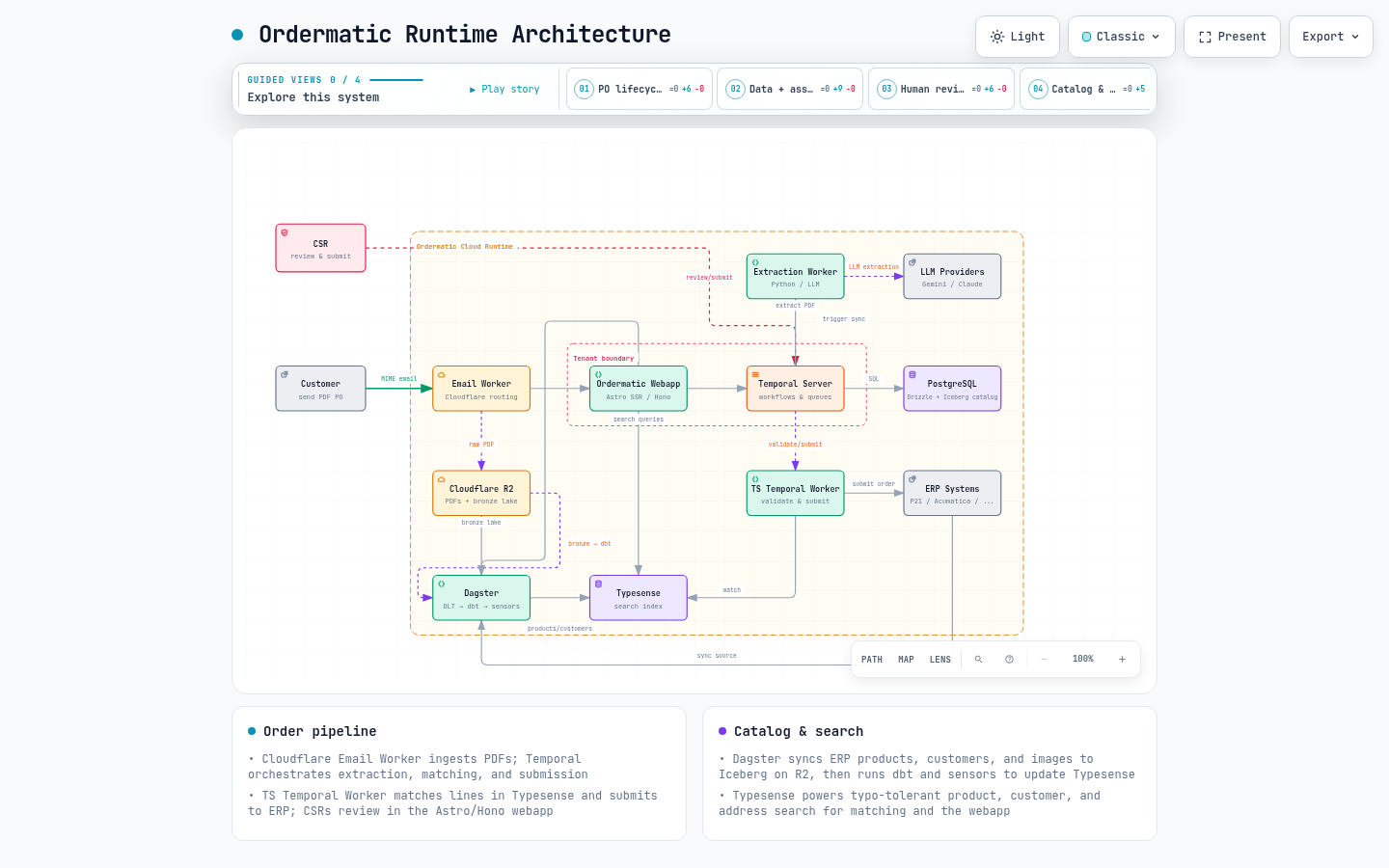
Static preview:
Source specification (single source of truth): ordermatic-runtime.architecture.json
What the map shows
Section titled “What the map shows”The diagram covers the components that participate in order processing and catalog/data synchronization.
| Area | Components |
|---|---|
| Inbound POs | Customer, Cloudflare Email Worker, Ordermatic webapp, Temporal Server |
| Extraction | Python Temporal Worker, LLM providers (Gemini / Claude) |
| Validation & submission | TypeScript Temporal Worker, ERP Systems (P21, Acumatica, etc.) |
| Review & search | CSR webapp, Typesense |
| Data & catalog pipelines | Dagster, Cloudflare R2 (bronze lake / PDFs), PostgreSQL |
Filtered views
Section titled “Filtered views”The artifact exposes four views. Each one hides unrelated nodes and routes so a reader can focus on one story at a time.
| View | Focus | Story |
|---|---|---|
| PO lifecycle | Customer, Email Worker, webapp, Temporal, validation, ERP | From inbound email to reviewed, extracted, validated, and submitted ERP order. |
| Data + assets | Email Worker, R2, Temporal, extraction, LLM, PostgreSQL, Dagster, Typesense, validation | PDFs, LLM extraction, Typesense matching, structured state, and data pipelines. |
| Human review | CSR, webapp, Temporal, validation, Typesense, ERP | CSR corrections, Typesense lookups, validation, and approval gates. |
| Catalog & search | ERP, Dagster, R2, Typesense, webapp | ERP data feeds Dagster, which writes R2/Iceberg, runs dbt, and syncs Typesense for the webapp. |
Mapping to the org wiki
Section titled “Mapping to the org wiki”The runtime map is intentionally high-level. For the code-level details behind each box, follow these wiki sections.
| Runtime map topic | Org wiki section |
|---|---|
| Platform overview | 1. Ordermatic Platform Overview |
| Order pipeline | 2. Core Order Processing Pipeline |
| Email / PDF ingestion | 2.1 Document Ingestion & Email Processing |
| Python extraction worker | 2.2 AI Extraction (Python Temporal Worker) |
| Typesense matching | 2.3 Product Matching & Auto-Validation |
| Validation & auto-submission | 2.4 Agentic Validation & Auto-Submission |
| ERP submission | 2.5 ERP Submission & Order Lifecycle |
| Webapp | 3. Web Application (webapp) |
| Review UI | 3.1 Review V2 UI — Order Review Interface |
| Auth & middleware | 3.3 Middleware, Auth & Security |
| PostgreSQL / schema | 4. Data Layer & Database |
| Dagster pipeline | 4.2 Dagster ERP Data Pipeline |
| Typesense | 4.3 Typesense Search Index |
| ERP integrations | 5. ERP Integrations |
Open the Devin org wiki and use these section numbers to find the matching pages.
Updating the map
Section titled “Updating the map”The JSON file is the single source of truth. Edit it, then run Archify to validate, deliver, and visually check.
# From the cloned archify repocd /path/to/archifynode bin/archify.mjs validate architecture \  /path/to/ordermatic/apps/docs/public/diagrams/ordermatic-runtime.architecture.json \  --quality showcase --json
node bin/archify.mjs deliver architecture \  /path/to/ordermatic/apps/docs/public/diagrams/ordermatic-runtime.architecture.json \  /path/to/ordermatic/apps/docs/public/diagrams/ordermatic-runtime.architecture.html \  --quality showcase --json
node bin/archify.mjs visual-check \  /path/to/ordermatic/apps/docs/public/diagrams/ordermatic-runtime.architecture.html \  --json
Only commit the map after validate and visual-check both pass with zero errors/warnings.
What’s not in this map
Section titled “What’s not in this map”This map is focused on the runtime order pipeline and catalog synchronization. It intentionally does not include:
- Infrastructure and deployment (Terraform, Ansible, GCP, Cloudflare Workers)
- Observability, tracing, logging, and evaluation quality gates
- MCP servers (
graph-mcp,content-mcp) - Internal admin portal and partner/auxiliary APIs
- Detailed security, feature flags, secrets management, and CI/CD
Those layers are documented in the org wiki. If they become part of the runtime onboarding path, they should be modeled as separate focused Archify diagrams rather than added to this single map, which keeps the node count within Archify’s recommended 6–12 primary components.