Document viewers
Order documents arrive as PDFs, images, spreadsheets, CSVs, and emails. This is the full review
document column — one viewer per format plus a DocViewer that routes by file type (the
design-system version of the app’s ReviewDocViewer). All use the same normalized (0..1) clickable
highlight overlays so extracted fields track the document at any render width.
PDFViewer
Section titled “PDFViewer”Renders a PDF page-by-page (fit-width) with clickable highlight overlays for extracted fields, built on pdf.js. The orange boxes are extraction highlights; click one to focus its field.
import PDFViewer, { type PDFHighlight } from '@repo/ui/PDFViewer';
const highlights: PDFHighlight[] = [  { page: 1, x: 0.08, y: 0.08, w: 0.34, h: 0.05, label: 'PO number' },];
<PDFViewer src="/orders/123.pdf" highlights={highlights} onHighlightClick={(h) => focusField(h.label)} onPageChange={setPage} />- SSR-safe: pdf.js is dynamically imported client-side; the worker loads from a Vite
?urlasset. Render as a client island. - Page nav (
‹/›) is keyboard-operable with a visible focus ring; highlights are buttons witharia-label. - Coords are normalized 0..1 relative to the page (resolution-independent). The app’s extraction
stores
page_rectin PDF points — convert withx / pageWidth,y / pageHeight.
Image, spreadsheet & email
Section titled “Image, spreadsheet & email”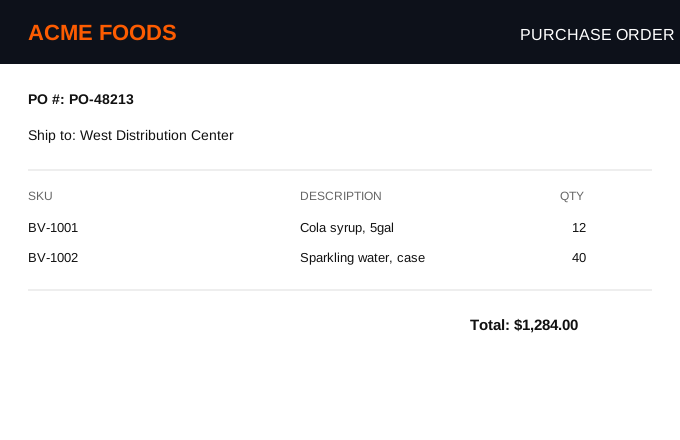
| 3 | SKU | Description | Qty | Unit |
|---|---|---|---|---|
| 4 | BV-1001 | Cola syrup, 5gal | 12 | $48.00 |
| 5 | BV-1002 | Sparkling water, case | 40 | $18.10 |
| 6 | BV-1003 | Citrus base, 2gal | 6 | $31.50 |
ImageViewer
Section titled “ImageViewer”import ImageViewer from '@repo/ui/ImageViewer';
<ImageViewer src={url} highlights={[{ x: 0.04, y: 0.2, w: 0.26, h: 0.06, label: 'PO number' }]} onHighlightClick={(h) => focusField(h.label)} />Image counterpart to PDFViewer: normalized (0..1) clickable highlight overlays, dark review
surface by default (surface="light" for the workspace). Overlays use % positioning, so they
track the image at any size.
SpreadsheetView
Section titled “SpreadsheetView”import SpreadsheetView, { parseCSV, type Sheet } from '@repo/ui/SpreadsheetView';
const sheets: Sheet[] = [ { name: 'West DC', detectedHeaderRow: 2, // metadata rows 0–1 sit above the table header badge: { kind: 'submitted', title: 'Submitted to ERP' }, rows: parsedRows, },];// Highlight the source row by matching an extracted item (fuzzy: SKU → name)…<SpreadsheetView sheets={sheets} highlightItem={{ itemIds: ['BV-1002'], itemName: '…' }} />// …or by explicit index:<SpreadsheetView sheets={sheets} highlightRows={[3]} />The full multi-tab PO shape (parity with the app’s SpreadsheetFullView):
detectedHeaderRow— metadata rows above the real header collapse into a disclosure (POs put title/ship-to/terms above the table); the header renders as proper<th>columns.- Multi-sheet tabs with status badges (
submitted ✓ / pending ⏳ / failed ✕ / info ⓘ). - Excel row-number gutter (real numbers preserved), empty row/column filtering, truncation footer.
- Fuzzy item→row highlight via
highlightItem—findMatchingRowIndexis exported (exact → leading-zero-normalized → containment → name). Clicking a matched row firesonRowClick.
Pass parsed sheets — the app gets these from its preview API; parseCSV handles raw CSV. Excel
binary parsing stays consumer/server-side; the primitive renders rows.
EmailPreview
Section titled “EmailPreview”import { EmailPreview, type EmailHighlight } from '@repo/ui/EmailPreview';
const highlights: EmailHighlight[] = [ { id: 'po', label: 'PO number', start: 28, end: 36 }, // char span into textBody];
<EmailPreview email={{ from, fromName, to, cc, subject, date, textBody, htmlBody, attachments }} highlights={highlights} activeHighlightId="po" onHighlightClick={(h) => focusField(h.id)} onAttachmentClick={(a) => openAttachment(a)}/>The email branch of the review doc viewer: header (from/to/cc/subject/date), body — HTML in a
sandboxed iframe or plain text — and clickable attachment chips. Many POs arrive as a forwarded
.eml/.msg with the real document attached, so the chips hand off to the matching viewer.
Extraction highlights use char spans ({ start, end }) into the body text — the same
text_span model the app’s extraction emits, since email text reflows and pixel rects don’t apply.
The active span gets a stronger ring and scrolls into view.
Both bodies are highlighted. Text body: every span is wrapped inline. HTML body: rendered in
an iframe with sandbox="allow-same-origin" (and never allow-scripts, so the email’s own JS
can’t run) plus a strict CSP that blocks scripts and remote loads; because nothing executes inside,
the parent safely reaches into the iframe DOM and wraps the active span via the Range API. Span
offsets resolve against textBody, or the rendered innerText if no textBody is given.
Why not a canvas? Rasterizing HTML still means rendering the untrusted markup in a DOM first (no safety gain), and a bitmap has no text geometry to position highlights on. Safety comes from the script-less sandbox + CSP, not from the container.
DocViewer
Section titled “DocViewer”import DocViewer from '@repo/ui/DocViewer';
<DocViewer fileType={doc.type} filename={doc.name} src={signedUrl} sheets={parsedSheets} text={textBody} email={parsedEmail} highlights={highlights} />Routes by fileType (mirrors ReviewDocViewer): pdf → PDFViewer, image types → ImageViewer,
xlsx/xls/csv → SpreadsheetView, eml/msg/email → EmailPreview, txt/text → inline text,
anything else → a download fallback. One component for the whole review document column.